A Quick “Contact Me” Fix

Apparently, the CGI script powering my mail form slipped through the cracks when I was setting up health monitoring for this site and had been giving error 500 for an unknown period of time.

It’s now fixed and I’ve rewritten it in PHP so that, hopefully, if such a problem occurs again, the blog will have died too and I’ll notice immediately. I also added suggestions for alternate contact methods on the form page.

Finally, feel free to use the comments thread on this page to report trouble.

Posted in Site Updates | Leave a comment

GitHub vs. BitBucket: Shifting Value Propositions

It used to be that GitHub vs. BitBucket was a no-brainer. GitHub was sleek, featureful, popular, and supported git, the godsend.

BitBucket was clunky, buggy, comparatively little-known, and required you to use that hg thing with the annoying workflow.

However, as time has gone on and Atlassian has continued to work on BitBucket, things seem to be shifting in BitBucket’s favor. BitBucket has added support for git, offers private repositories in their free tier, and continues to make minor improvements every now and then, while GitHub seems to be backsliding.

Oh, GitHub still looks nicer by a mile and continues to improve on that front, but what you can do with it and how you communicate are backsliding (and communication is the whole point of the thing). For example, in recent months, GitHub has:

Killed off the private messaging system

GitHub claims that, by killing off their private messaging system, they’re serving us better by giving us one less inbox to manage… yet I still obsessively go into GitHub every few days to flush out the pointless “GitHub Pages built successfully” messages and duplicates of bug notifications that pile up in the “notifications” inbox.

(And the only button that applies to everything is “mark as read”, so I manually have to click every single entry to delete them… including a page reload after every ten clicks.)

Couldn’t they just have ditched both web inboxes, kept the PM form, and forwarded all messages directly to my primary e-mail address for handling?

Forcing me to expose my e-mail address to the world if I want to be reachable and forcing me to abuse the issue tracker to communicate with like-minded individuals is so bass-ackwards that it makes SourceForge seem superior!

Update: GitHub now supports only receiving notifications via e-mail, but they still haven’t provided a replacement for the PM form’s old status as a spam-proof, guaranteed-to-be-there way to contact another user.

Started requiring that user.email actually be an e-mail

At first glance, this may seem reasonable… except that git itself doesn’t enforce that constraint and git is famous for not letting you rewrite old commits without breaking push/pull with everyone else’s branches.

What makes it even worse is that, since GitHub used to support it, who knows how much data was submitted which once was valid and now isn’t. Smart move, guys.

I don’t know about you, but I’d rather give up having my commits hyperlinked to my account (or, even better, just switch to BitBucket, which still allows arbitrary strings) than leave a genuine e-mail address lying around where every spambot in the world can find it.

I’ll be sticking with http://www.ssokolow.com/ContactMe as my commit ID’s “e-mail address”, thank you very much.

Replaced their blog comments with Twitter

As Christian Heilmann elaborated on, Twitter is not a discussion platform because its character limit kills nuance in discussion, it has no threading, and its structure makes it nearly impossible for anyone but the author of the blog post to gauge community reaction.

If I find news sites without comment systems unsatisfying and/or distasteful enough to avoid them, I’m not going to be very enthused about a “Web 2.0” code-hosting site that does the same with their public announcements. I don’t care whether it’s spin-doctoring or just laziness. (Again, if I wanted the latter, SourceForge has it in spades)

 So… BitBucket

So, these days, what exactly does BitBucket do wrong, aside from losing the network effects battle?

Surprisingly little from what I’ve been able to tell… they just made some bad choices in what they did wrong:

No GitHub Pages Competitor

Most of the time, when people host a project, they actually care about getting potential users interested in it. That means they need to host screenshots and logos and possibly even JavaScript demos so they can make a good first impression. It also means they probably want to give their project a memorable look and feel. Wikis, issue trackers, and repository browsers don’t do that.

I’m told BitBucket has support for a per-user Pages equivalent, but that’s not really a big help (It took me ages to find a use for GitHub’s per-user Pages support but I was using per-project pages from day 1) and it’s so under-documented that, despite looking for it, I spent months not knowing it existed. (BitBucket’s opportunity to be worse than SourceForge)

If I’m going to have to pay for site hosting anyway, I might as well just host my own git repository and bug tracker while I’m at it and gain more customization support.

Poor First Impression for Project Pages

With no equivalent to GitHub Pages, the full burden of making a good first impression falls to the project pages. Unfortunately, they are also in need of some TLC.

First, they still knock-off GitHub’s old theme, which now feels five years out of date. Not a good first impression to make when the projects you compete against for attention are probably hosted on GitHub.

Second, the default configuration for a project’s landing page shows off their most recent commits and their README file. The problem is, in my experience, there are three pieces of information, from most to least urgent, that I want to know when I visit a project’s landing page:

  1. What it’s about. (GitHub and BitBucket both get this right by showing the README.)
  2. What the license is. (Neither GitHub nor BitBucket support this explicitly, but GitHub’s overview page makes it trivial to see and click on the COPYING or LICENSE file.)
  3. What language the project is written in. (Same situation as the previous point.)
  4. How actively developed the project is. (GitHub didn’t used to show the most recent few commits on their overview page, but if the first three are satisfied well, then I have no problem with one click to check the commit log.)

Yes, you can configure your BitBucket repository to show the tree browser as the default, but then it doesn’t display the README, which is even worse.

So where does this leave us?

For now, I’ll continue to use GitHub… maybe with a public e-mail like use.the.mail.form at ssokolow.com which I can make valid only long enough for GitHub to accept it.

However, they’re on very thin ice and, hopefully, BitBucket will wake up, seize this opportunity, and give GitHub enough competition to restore progressive (rather than regressive) innovation to code-hosting sites.

(Seriously, Google Code? You thought it was helpful to remove the project activity overview when the majority of projects on established sites are dormant and possibly buggy?)

Update: While our needs differ on things like the importance of a valid e-mail address, Linus Torvalds also makes good points on GitHub’s shortcomings. Not sure how BitBucket compares though. Probably equally poorly. (A little something that came to my attention via Planet Mozilla)
Posted in Web Wandering & Opinion | 4 Comments

Open Source for MBAs: A Primer

If you’re neither a scientist, nor active in the open-source community, it can be difficult to properly understand why people write open-source software. Why would people just give away the products of so much hard work?

I fully understand why one would be wary of a free product with no apparent profit model. After all, it’s only proper caution to check for Trojans when receiving a horse.

The trick with open-source software is to think about it in different terms. Traditionally, if you needed a piece of software or documentation or some other product that can be copied or photocopied, you had two options:

  1. You could find something that met your needs and then pay per-seat or per-site for a version someone else had written.
  2. You could hire someone to create your own version from scratch.

Paying for an existing solution can get expensive if you need a lot of copies, but writing your own version from scratch usually costs even more.

Using someone else’s solution makes you dependant on them for fixing bugs and writing new features, but writing and maintaining your own draws resources away from competing in whatever markets you occupy.

Open-source provides a third option with a slightly different payment structure. Instead of money, open-source vendors want you to pay for their software in externalities and, if they’re lucky, maybe you’ll chip in with a bug fix or a new feature to sweeten the pot for everyone.

One popular way is to set up a business to sell support contracts to businesses using the software in mission-critical places… often at prices lower than companies like Oracle and Microsoft who know they have you by the unmentionables.

Here are a few other examples of externalities that commonly motivate people to give away their code:

  1. If you write a piece of software to solve your own problems, up to 90% of the time and money you spend on it over its lifetime can be spent on maintenance. If it’s not the “secret sauce” that makes your business competitive, then it’s just an expense and sharing the code with the world is a non-taxable payment for good publicity and an air of progressiveness in the eyes of potential employees. It may also reduce the amount of money spent if someone else fixes a bug and submits the fix back to you.
  2. On a more individual level, we all like to be acknowledged. Contributing to an established open-source project or founding one that becomes popular is one of the quickest and easiest ways to build a favourable reputation among your peers, expand your resumé, and gain portfolio pieces that aren’t crippled by restrictive copyright terms.
  3. Why involve the overhead of charging for your software, collecting sales tax, and then paying the money to advertising agencies to set up “viral marketing” campaigns, when giving it away for free cuts out the middle-men and takes you straight to “If people use your software and like it, then they will tell their friends and co-workers.” (Genuine word-of-mouth advertising is also more sincere and, therefore, more lasting)
  4. If you run a successful open-source project, nothing makes a better business card for your support services than letting potential customers use and customize your software for low-risk applications for free. Even big companies like Microsoft often use a variation on this technique when they allow a certain amount of illegal copying in order to get individuals hooked on and familiar with their products. Open-source just introduces honesty and a better ethical and moral framework to the technique.
  5. If you give away your software for free, like many companies do with the “non-Pro” versions of their tools, people are dependant on you for any changes they need. Fixing bugs, adding features, etc. That’s a heavy burden to carry and, if you fall behind, it’s bad for your reputation. If you release the source code, you are granting skilled users and companies the ability to fix problems they encounter, and to then offer the fix to everyone without putting more pressure on you.

Just because open-source developers and vendors aren’t getting paid for their software in money doesn’t mean they aren’t getting paid. To an open-source developer, their software is their business card, a pride-worthy piece of art they want to share with the world, a tool they crafted to fix their own problems, a foot in the door for related products and services, and the seed for a group of like-minded people to collaborate with.

Also, while it doesn’t necessarily affect the bottom line, programmers often have a deep understanding of how easy it is to copy software, which makes one’s job more satisfying if they know they’re being paid for their time (which is a scarce commodity) rather than copies of their software (which are vanishingly cheap to make).

As a final acknowledgement, if you are considering sharing software that you’ve written yourself, there are a few hidden gotchas to getting a community to form and they all boil down to whether or not potential participants feel empowered. Here are the basic rules:

  • Use an un-modified version of a popular license that people know and understand, like the Apache license or the GNU GPL or LGPL licenses. Legalese is scary and programmers aren’t lawyers.
  • Write clear instructions on how to compile a working program from your code. Make sure they actually work on a freshly installed machine. (I use VirtualBox for this)
  • Provide an easy-to-use system for filing bug reports and feature requests, and offering up contributions. There are many tools for this as well as sites which will host your project for free. (I suggest GitHub or BitBucket)
  • Strive to make participants feel that their concerns are being listened to.

In short, there needs to be a smooth learning curve that can take people from “just wandered in” all the way up to “respected participant”.

Posted in Geek Stuff | 3 Comments

Controlling OpenPandora LEDs in Python

For those who don’t know me, I don’t like cell phones for a variety of reasons… but I do want a pocket computer, so I picked up what is essentially a pocket laptop made of cellphone parts named the OpenPandora.

Like normal-sized laptops, this nifty little device has a bunch of LEDs for indicating whether the WiFi is on, whether the battery is charging, and so on. Unlike many laptops, it was pretty easy to find documentation on how to control them in software.

For any other OpenPandora users who might be interested, here’s a little demo and helper library which makes the left bank of LEDs behave like KITT‘s scanner (without fading) while the charging indicator blinks.

I didn’t demo the partial brightness support on the power and charging LEDs but the helper library supports it.

The module docstring includes a few suggestions for where to go from here if you want to try something a little more challenging.

Posted in Geek Stuff | 1 Comment

Treating The Symptom: A Privacy Law Story

In May 2011, new legislation was passed in the EU (directive 2009/136/EC) which was intended to require opt-in for tracking cookies. It comes into effect on May 26, 2012. Next Saturday.

While people are agonizing over how compliance will gut websites’ ability to identify and meet user demand, that’s not the problem. The problem is that, in order to have jurisdiction over attempts to weasel out of it by Google and Facebook, it doesn’t set clear boundaries. It’s up to judges to determine whether cookies like PHPSESSID require prior opt-in from users and not even employees of the UK government are eager to comply.

What’s worse is that it probably won’t even work. Experience with technologies like ActiveX and Windows UAC has shown that people just learn to click “Accept” without reading when constantly bombarded. Even if they don’t nag, the EFF’s Panopticlick has already demonstrated that, with an IP address and a fingerprint of a user’s browser headers, you can track individual users pretty well unless they’re all behind the same NAT and on the same IT deployment image.

A solitary 1×1-pixel transparent GIF from a 3rd-party server is a blatant violation of any privacy laws you might care to craft, but what about a reCAPTCHA? …or a Google Font Library embed? …or that copy of jQuery everyone seems to load off Google these days? Every request for one of those leaks your current location via the Referer header and you can’t turn it off because that will break sites like Snopes.com, Pixiv.net, and many others which use it for hotlinking protection. (Though individual Firefox users can use RefControl to forge a nonsense Referer on all other sites)

User analytics via server logs (eg. /var/log/apache2/access.log) predates Javascript-based analytics and, if anyone has the raw data necessary to design a robust user fingerprint which can survive minor changes like browser upgrades (and an analytics package which uses statistical probability analysis for reliability), it’s companies like Google and Facebook.

Aside from driving companies to implement tracking that’s harder to neuter without companies’ co-operation, my big concern is that some EU company with deep pockets will use this as an opportunity to cripple smaller competitors by forcing them to jump through too many compliance hoops. It’s bad enough that big U.S. companies achieve a similar effect with software patents.

Posted in Web Wandering & Opinion | Leave a comment

The State of Digital Distribution on Linux

Note: This is cross-posted from the blog in my Desura account to ensure my backup system catches it.

After one of my previous posts, showing off my obsession with flowcharts and how much I overthink buying new games, it occurred to me that I can actually focus on a question other people might care about: How does one comfortably manage their games collection on Linux these days?

The only options I’ve been able to find for getting Linux games online are as follows and only the first three have package management beyond “download this installer” (though Gameolith plans to add private package repositories):

However, when most people think of digital distribution (the buzzword), we think of a unified experience that takes the hassle out of managing our games for us. (In other words, something developers have to support or else like Steam)

Obviously, nothing as comprehensive as that exists for Linux yet, but we can try to MacGyver things up for now. I’d like to hear what your approach is in the comments, but here’s the best I’ve been able to accomplish.

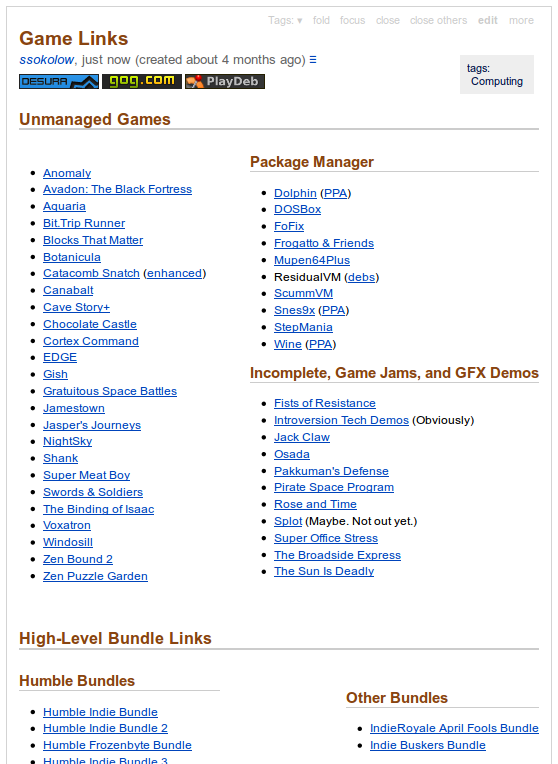
The State of Digital Distribution on Linux

It’s not ideal, but I tried and, since I’m already using TiddlyWiki to manage everything else, it’s quite comfortable.

The key details are:

  • The Desura button is a direct link to the client download page.
  • The PlayDeb button and the PPA links in the “Package Manager” section are direct links to the lines I’ll need to re-add to /etc/apt/sources.list if I re-install.
  • The GOG.com button is a direct link to the “your games” page.
  • The non-bracketed links in the “Package Manager” section use apt: URLs to trigger the package installer from the browser.
  • The rest are just links to the page where you choose your download type (deb, rpm, installer, etc.)

I’m still working on polishing up and streamlining everything, but I’m already making good progress on polishing up Desura as a general game launcher. Here’s what it looks like once I’ve added a few native Linux games and a few Windows games via Wine and wrapper scripts:

Results of set_icon.py

You can do this yourself, if you want, by using the set_icon.py script I wrote. It’ll even extract icons from .EXE files for you.

When I have time, I’m also planning to work on:

  • Making set_icon.py work on Windows. (The main issue is using Windows methods to find Desura and extract icons from .EXE files rather than Linux ones)
  • A script which will create a wrapper for a Wine application, extract the icon, and add it to Desura with one command.
  • A script which will sync all the games in my Linux desktop’s launcher into Desura (both additions and deletions) with one command.
Posted in Geek Stuff, Lair Improvement | 5 Comments

Secure Cloud Backup/Sync

Given the mounting concerns over cloud storage offerings and the increasing occurrence of bills like ACTA and CISPA, it’s becoming increasingly important to find alternatives to US-based, un-encrypted cloud storage services like Dropbox.

The question for poor saps like me is, who can we trust without paying even more money? Well, here are the cross-platform cloud backup/sync providers I’ve found which assure you that, like Firefox Sync, data is encrypted before it leaves your computer and they can’t recover it if you lose your key:

Name Free Plan Extras
SpiderOak 2GiB + 1GiB/referral Optional 2-factor auth via smartphone. In-depth technical details of their encryption are public.
TeamDrive 2GiB + 250MiB/referral German company. Security has approval from an independent authority. Can also self-host.

As an alternative, if you have VPS, co-located server, or feature-rich shared hosting in a country you trust, you can also run your own service using open-source software.

Just keep in mind that most options don’t encrypt data on the server so, if you get hacked or police confiscate your server, they probably will grab copies of your data before someone thinks to power it off and lose your eCryptFS or EncFS keys. (EncFS on the client might work though, but it’s not secure against attacks based on watching the encrypted data change over time.)

Client Server Encrypted Storage? Notes
SparkleShare ssh+git No Dropbox-like client. SSH Public-Key authentication.
various (WebDAV) ownCloud Limited Planned Has WebUI. Supported by remoteStorage.js.
duplicity ssh, rsync, ftp, WebDAV, Amazon S3, … Yes Linux-only. Sync is one-way like rsync. Client encrypts before sending to server.

I’d also keep an eye on Syncany. It’s not out yet, but if it doesn’t end up broken or vaporware, it looks like it will be a good hybrid of SparkleShare and duplicity.

Please feel free to suggest further alternatives in the comments. I’ll update the post if they look good.

Posted in Geek Stuff | 3 Comments